# Plasma button kit on a Picade with PI5 still doesn't work
**URL:** https://forums.pimoroni.com/t/plasma-button-kit-on-a-picade-with-pi5-still-doesnt-work/27944
**Category:** Picade
**Created:** [June 21, 2025, 6:58pm UTC](https://forums.pimoroni.com/t/plasma-button-kit-on-a-picade-with-pi5-still-doesnt-work/27944 "2025-06-21T18:58:14Z")
**Posts on this page:** 8
**Page:** 1
### Author:  [@Pilou75](https://forums.pimoroni.com/u/Pilou75)
#### Post date: [June 21, 2025, 6:58pm UTC](https://forums.pimoroni.com/t/plasma-button-kit-on-a-picade-with-pi5-still-doesnt-work/27944/1 "2025-06-21T18:58:15Z")
Hello dear bucaneers, i’m coming back for new adventures. :)
I have a Picade 10" from which i have changed the “old” PI4 by a brand new PI5 with a 512K NVME installed on it. It works just great! It’s a home made solution mainly based on the [SonicProd](https://gist.github.com/sonicprod/f5a7bb10fb9ed1cc5124766831e120c4) solution and with [ArcadeFlow](https://zpaolo11x.github.io/Arcadeflow/) as the Front-End running on [Attract Mode +](https://github.com/oomek/attractplus). And it’s just a killing front-End to execute MAME games with a PI5.
i also have the [Plasma buttons Kit](https://shop.pimoroni.com/products/picade-plasma-kit-illuminated-arcade-buttons) installed on my Picade. They worked just fine with the PI4 but not with the PI5! I abandonned few months ago to try to make them work. It seems that there was a Python GPIO library required for the Plasma buttons which didn’t exist for the PI5 but I’m not an expert in those deepest technical things. I thought that after several months this problem would be solved now. But it I still didn’t find the way to make them work. I see that the buttons are still available in the Piromoni shop with no restriction concerning the PI version. So my question is: how do you make those damned plasma buttons working on a Picade with a PI5?
---
### Author:  [@alphanumeric](https://forums.pimoroni.com/u/alphanumeric)
#### Post date: [June 22, 2025, 8:12am UTC](https://forums.pimoroni.com/t/plasma-button-kit-on-a-picade-with-pi5-still-doesnt-work/27944/2 "2025-06-22T08:12:36Z")
Did you do the?
`curl https://get.pimoroni.com/plasma | bash`
As per,
[pimoroni/plasma-python: Plasma LED driver, FX Sequencer and plugins](https://github.com/pimoroni/plasma-python)
---
### Author:  [@Pilou75](https://forums.pimoroni.com/u/Pilou75)
#### Post date: [June 22, 2025, 8:26am UTC](https://forums.pimoroni.com/t/plasma-button-kit-on-a-picade-with-pi5-still-doesnt-work/27944/3 "2025-06-22T08:26:42Z")
Thanks for your help @alphanumeric , that’s the first thing I did and that’s the result:
```auto
pi@picade:~ $ curl https://get.pimoroni.com/plasma | bash
% Total % Received % Xferd Average Speed Time Time Time Current
Dload Upload Total Spent Left Speed
100 34969 100 34969 0 0 134k 0 --:--:-- --:--:-- --:--:-- 134k
This script will install everything needed to use
Plasma Lights
Always be careful when running scripts and commands copied
from the internet. Ensure they are from a trusted source.
This script should -- only be run on a Raspberry Pi with RPi OS --
other systems and SBCs are not supported and may explode!
If you want to see what this script does before running it,
you should run: 'curl https://get.pimoroni.com/plasma'
Do you wish to continue? [y/N] y
Checking environment...
Updating apt indexes...
...............
Checking hardware requirements...
Checking for packages required for GPIO control...
raspi-gpio is already installed
Checking for dependencies...
lsb-release is already installed
Github repo already present. Updating...
...Already up to date.
Finalising Install...
sudo: ./install.sh: command not found
Support for your operating system is experimental. Please visit
forums.pimoroni.com if you experience issues with this product.
pi@picade:~ $ ...
pi@picade:~ $
```
Then i also tried the folliwing proposal from the plasma-python github:
```auto
pi@picade:~ $ git clone https://github.com/pimoroni/plasma
cd plasma/daemon
sudo ./install
Cloning into 'plasma'...
remote: Enumerating objects: 603, done.
remote: Counting objects: 100% (603/603), done.
remote: Compressing objects: 100% (261/261), done.
remote: Total 603 (delta 304), reused 550 (delta 259), pack-reused 0 (from 0)
Receiving objects: 100% (603/603), 115.54 KiB | 1.07 MiB/s, done.
Resolving deltas: 100% (304/304), done.
-bash: cd: plasma/daemon: No such file or directory
sudo: ./install: command not found
pi@picade:~ $
```
I installed a Raspberry Pi OS Lite.
And here is the last info:
```auto
pi@picade:~ $ cat /etc/os-release
PRETTY_NAME="Debian GNU/Linux 12 (bookworm)"
NAME="Debian GNU/Linux"
VERSION_ID="12"
VERSION="12 (bookworm)"
VERSION_CODENAME=bookworm
ID=debian
HOME_URL="https://www.debian.org/"
SUPPORT_URL="https://www.debian.org/support"
BUG_REPORT_URL="https://bugs.debian.org/"
pi@picade:~ $
```
---
### Author:  [@alphanumeric](https://forums.pimoroni.com/u/alphanumeric)
#### Post date: [June 22, 2025, 8:49am UTC](https://forums.pimoroni.com/t/plasma-button-kit-on-a-picade-with-pi5-still-doesnt-work/27944/4 "2025-06-22T08:49:31Z")
> [@Pilou75](#):
>
> `cd: plasma/daemon: No such file or directory`
Check your folder structure. You may have to cd pimoroni, cd plasma etc, to get to the install file.
What happens when you try to run an example?
Bookworm uses a python virtual environment, is that what you are doing?
---
### Author:  [@Pilou75](https://forums.pimoroni.com/u/Pilou75)
#### Post date: [June 22, 2025, 2:53pm UTC](https://forums.pimoroni.com/t/plasma-button-kit-on-a-picade-with-pi5-still-doesnt-work/27944/5 "2025-06-22T14:53:08Z")
Thanks for the feedback @alphanumeric .
The `curl https://get.pimoroni.com/plasma | bash` command generates the following folder structure `Pimorono/plasma/plasma` which contains:
```auto
pi@picade:~ $ ls -l Pimoroni/plasma/plasma/*
-rw-r--r-- 1 pi pi 2868 Jun 22 15:34 Pimoroni/plasma/plasma/README.md
Pimoroni/plasma/plasma/boards:
total 24
-rw-r--r-- 1 pi pi 1660 Jun 22 15:34 common.cmake
-rw-r--r-- 1 pi pi 123 Jun 22 15:34 manifest-common.py
drwxr-xr-x 2 pi pi 4096 Jun 22 15:34 plasma_2040
drwxr-xr-x 2 pi pi 4096 Jun 22 15:34 plasma_2350_w
drwxr-xr-x 2 pi pi 4096 Jun 22 15:34 plasma_stick_2040_w
-rw-r--r-- 1 pi pi 1505 Jun 22 15:34 usermod-common.cmake
Pimoroni/plasma/plasma/ci:
total 12
-rw-r--r-- 1 pi pi 4517 Jun 22 15:34 micropython.sh
-rw-r--r-- 1 pi pi 1128 Jun 22 15:34 python.sh
Pimoroni/plasma/plasma/docs:
total 8
-rw-r--r-- 1 pi pi 6606 Jun 22 15:34 plasma.md
Pimoroni/plasma/plasma/examples:
total 24
-rw-r--r-- 1 pi pi 2662 Jun 22 15:34 hue_twinkles_encoder.py
-rw-r--r-- 1 pi pi 2795 Jun 22 15:34 main.py
drwxr-xr-x 2 pi pi 4096 Jun 22 15:34 plasma2040
drwxr-xr-x 2 pi pi 4096 Jun 22 15:34 plasma_stick
-rw-r--r-- 1 pi pi 34 Jun 22 15:34 secrets.py
-rw-r--r-- 1 pi pi 2008 Jun 22 15:34 sparkles.py
Pimoroni/plasma/plasma/modules:
total 8
drwxr-xr-x 2 pi pi 4096 Jun 22 15:34 common
drwxr-xr-x 2 pi pi 4096 Jun 22 15:34 wireless
pi@picade:~ $
```
There is no `install.sh` anywhere in it:
```auto
pi@picade:~ $ find Pimoroni/plasma/plasma/ -name install.sh
pi@picade:~ $
```
I can’t execute anything the main command is not found.
```auto
pi@picade:~ $ plasmactl --list
-bash: plasmactl: command not found
```
For additional info i also tried the manual install
```auto
pi@picade:~ $ sudo pip3 install plasmalights
sudo: pip3: command not found
```
So i did the following:
```auto
pi@picade:~ $ sudo apt install python3-pip
```
Then
```auto
sudo rm /usr/lib/python3.11/EXTERNALLY-MANAGED
```
Then
```auto
sudo pip3 install plasmalights
```
Same result… nothing works.
And trying to run from the examples:
```auto
pi@picade:~/plasma/examples $ python ./main.py
```
I had first to install the python modules `urequests` and `ezwifi` but still no success:
```auto
pi@picade:~/plasma/examples $ python ./main.py
Traceback (most recent call last):
File "/usr/local/lib/python3.11/dist-packages/comtypes/ __init__.py", line 5, in
from _ctypes import COMError # noqa
^^^^^^^^^^^^^^^^^^^^^^^^^^^^
ImportError: cannot import name 'COMError' from '_ctypes' (/usr/lib/python3.11/lib-dynload/_ctypes.cpython-311-aarch64-linux-gnu.so)
The above exception was the direct cause of the following exception:
Traceback (most recent call last):
File "/home/pi/plasma/examples/./main.py", line 4, in
from ezwifi import connect
File "/usr/local/lib/python3.11/dist-packages/ezwifi.py", line 3, in
from ezwlan.ezwlan import *
File "/usr/local/lib/python3.11/dist-packages/ezwlan/ezwlan.py", line 1, in
from ezwlan.wlanapi import *
File "/usr/local/lib/python3.11/dist-packages/ezwlan/wlanapi.py", line 3, in
from win32wifi.Win32NativeWifiApi import *
File "/usr/local/lib/python3.11/dist-packages/win32wifi/Win32NativeWifiApi.py", line 26, in
from comtypes import GUID
File "/usr/local/lib/python3.11/dist-packages/comtypes/ __init__.py", line 15, in
raise ImportError(msg) from e
ImportError: COM technology not available (maybe it's the wrong platform).
Note that COM is only supported on Windows.
For more details, please check: https://learn.microsoft.com/en-us/windows/win32/com
pi@picade:~/plasma/examples $
```
---
### Author:  [@alphanumeric](https://forums.pimoroni.com/u/alphanumeric)
#### Post date: [June 22, 2025, 3:57pm UTC](https://forums.pimoroni.com/t/plasma-button-kit-on-a-picade-with-pi5-still-doesnt-work/27944/6 "2025-06-22T15:57:24Z")
I had to run sudo ./install\*\*.sh\*\*
I downloaded the zip, then extracted it to my home folder.
Then did a
`cd plasma-python-master`
`sudo ./install.sh`
It appeared to install OK, I don’t have anything plasma connected though. This was on a Pi 5 running 64 bit desktop, Bookworm.
You can contact Pimoroni Tech support directly, via e-mail.
[Contact Us for Raspberry Pi Technical Support - Pimoroni](https://shop.pimoroni.com/pages/contact-us)
---
### Author:  [@Pilou75](https://forums.pimoroni.com/u/Pilou75)
#### Post date: [June 22, 2025, 4:29pm UTC](https://forums.pimoroni.com/t/plasma-button-kit-on-a-picade-with-pi5-still-doesnt-work/27944/7 "2025-06-22T16:29:51Z")
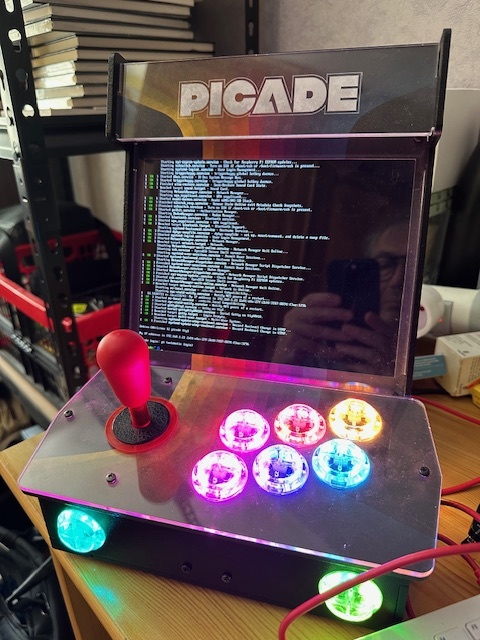
Your solution worked just fine, many thanks @alphanumeric ! :)
```auto
git clone -b master https://github.com/pimoroni/plasma-python.git
cd plasma-python/
sudo ./install.sh
```
---
### Author:  [@alphanumeric](https://forums.pimoroni.com/u/alphanumeric)
#### Post date: [June 22, 2025, 4:55pm UTC](https://forums.pimoroni.com/t/plasma-button-kit-on-a-picade-with-pi5-still-doesnt-work/27944/8 "2025-06-22T16:55:23Z")
Nice, I was hoping one of us would stumble on the answer. =)