OH how embarrassing, I even spell your company name wrong.
I re entered the lines with the changes you had shown and the virtualenvs got created, or looked like it did.
The journalctl worked and I got a few pages of info.
python /home/bob/unicorn-hat-hd/examples/xmas-tree.py (my address for the file) returned
home/bob/home/bob/unicorn-hat-hd/examples/xmas-tree.py no file found
even though I was in what I assume is the root directory i.e.
bob@raspberrypi:-s
when I removed the home/bob and just entered
python /unicorn-hat-hd/examples/xmas-tree.py the file ran showing the tree on the display.
When I did
@reboot /unicorn-hat-hd/examples/xmas-tree.py &
I got
bash: @reboot: command not found
If I put reboot /unicorn-hat-hd/examples/xmas-tree.py &
I get ‘ failed to write reboot parameter file: permission denied ‘
It’s been so long since I opened a cron file I had forgotten all about it.
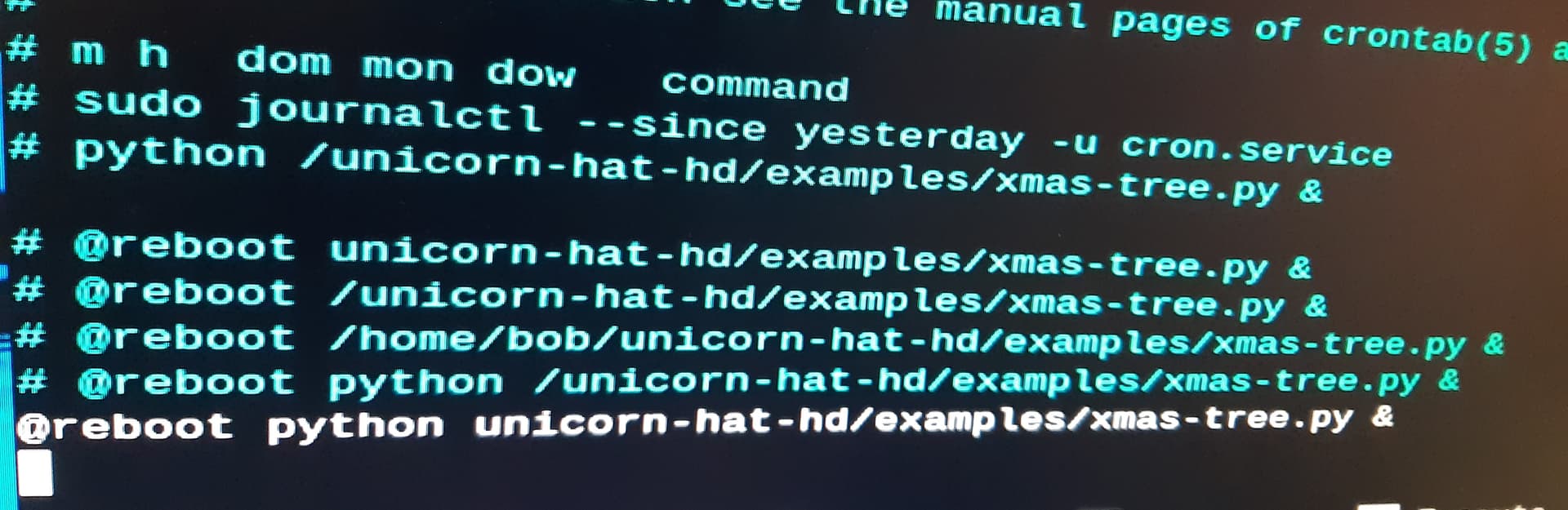
Above is a picture of the bottom of the cron file.
The two commented out lines above the gap are just aid memoirs for me as I have my windows computer in one room and the ‘PI’ in another.
I tried a number of options as you can see from the lines below the gap and the bottom one worked so it now loads and runs the tree when I plug 5v into it.
I CAN ONLY PUT 1 EMBEDDED MEDIA INTO A POST SO SEE THE NEXT ENTRY.
The picture above is the result of putting the journalctl line in.
The top 9 lines are the result of starting the cron line with ‘python /unicorn-hat-hd’
and the bottom 6 are the correct format of the line with the / missing before unicorn-hat-hd.
I was hoping the top set would say something like ‘no file found’ as a help but it doesn’t?
I hope to be able to use this to start other files so I can use the ‘PI’ as a stand alone processor, do you think just adding the relevant lines into the cron file in another ‘PI’ would work or have we ‘built’ something else into this ‘PI’ that it won’t run without?
The link you gave me goes on a bit about setting times for commands to run but I suppose it is a powerful addition that actually does very little but can be very useful.
Are you based in the Sheffield office, if so maybe if Aspire lets me join the van when they next visit you I can thank you in person.